|
Dear Cyclos customer,
We are happy to announce that new versions of Cyclos and the Cyclos mobile app have been released. Cyclos 4.16 can be downloaded from our license server, the mobile app (version 2.12 and 2.13) hasbeen published at the google play store and the apple app store.
This newsletter contains a summary of all the new features and improvements that were added since our last newsletter.
Mailing improvements
Cyclos mailings can now be sent using a step-by-step wizard. There is the possibility to send a classic email mailing, an SMS mailing, or a push notification to the mobile device (see next paragraph for more details). This wizard has the following features:
- Selecting the receivers (from a user list with search filters)
- Preview the message with (optional) variables applied. It is possible to switch to another user to check if different variables are being applied
- Send a test message (email, SMS, or Firebase)
- Send the message/mailing
- Search in mailing history with filters group, users (receivers), and mailing status
Firebase mailings
Push notifications can now be sent to Android and iPhone devices for mailings, making it much easier to communicate directly with mobile-only users. This can be used for special promotions or important surveys for example. It is possible to define what mobile page will be opened when a user clicks on the Firebase message. This mobile page can be an existing page like a mobile content page or a custom operation for example. The custom operation would be used for taking the survey and can be used for a lot of other use cases too.
This feature is very powerful because you can send messages directly to the user's phone, even when the Cyclos app is not running. We recommend using it with care and only when it’s needed. When the user has the permission to manage his notification settings he can easily disable these mobile app mailings.
New Firebase notification setting
In the previous version of Cyclos, it wasn’t possible for users and admins to set which notifications would be sent by default using Firebase (to the mobile app). Now it is possible to control it in the same way as it’s done for email and SMS notifications.
Email notification on login from a new device
To warn users about possible unauthorized access to their account, users will now receive a notification when a login is done from a new device (e.g. phone, browser). This notification is sent to the email of the user informing about the login, the device operating system, browser, IP address and explanatory text (that can be customized by an admin).
The notifications can be enabled in the configuration, so they can be customized and enabled for specific groups.
Manage IP address access
In some cases Cyclos blocks access from an IP address, this is done to prevent brute-force attacks. A typical access event is when the IP address of a user got blocked because of maximum failed login attempts. We have added a page in the administration section where admins can see the IP addresses list, and there is also a history (tab) with a searchable history of all IP address status changes.
Selecting an IP address from the list will open a page with the details (IP address, user, geolocation, status). On this page, an admin can add a comment and change the status of the IP address (always allowed, always denied or temporarily blocked). When an IP is temporarily blocked you can use the unblock button in the IP address details page, this will allow the user to login again.
If you want to ensure that some IPs are never blocked (e.g. the IP of your office or a partner) there is an option to manually enter an IP address and set the status to ‘always allowed’ so that the IP address will never be blocked.
If IP geolocation is enabled in Cyclos (in the configuration) the location of the IP address is shown on a clickable (google) map on the IP address details page.
Note: The IP addresses feature requires global admin permissions, and the rules defined at this level will override the IP white/black lists in the access channels.
User logs
User (history) logs contain information about changes to user entities (e.g. profiles, phones, addresses, advertisements, records and tokens). The history log details page shows a list of changes since the entity has been created. It shows the person who made the change (the user itself, broker or admin) with a timestamp, the IP address, the access channel, and the old and the new value of the field that was modified.
In previous Cyclos versions, the history log could only be accessed via the history tab or link in the corresponding page (e.g. from the user profile, advertisement, record, etc.). In 4.16 we added a central ‘User logs’ search page in the reports section. The feature has various useful search filters. It is for example possible to retrieve a list of changes done by a specific admin or broker, you can filter for specific user entities, and within a specific period. The details page of the log has a button that will navigate to the corresponding entity page.
Apart from the changes of above-described values such as profile fields, addresses, phones, etc., it is now also possible to search by ‘User actions’. With the User actions filter an admin can search for the following actions: changed user status (e.g. user blocked), changed group (e.g. user moved to another group), broker assignments and individual product assignments.
Note: User entity changes are also logged to the log files or to a log database (depending on the configuration).
Access logs
All access to Cyclos is logged in the ‘access logs’. It contains the user, the IP address, the channel, a timestamp and device information. As with the user changes logs, access events are also logged to log files or a log database.
To facilitate troubleshooting and monitoring we added an access log search page in the reports section. It is possible to search by user, period and access channel.
As with the IP addresses feature, if IP geolocation is enabled in Cyclos (in the configuration) the Access log details page will show the location of the IP address on a (google) map.
Improved quick-access icons on the dashboard
Next to the built-in quick access functions (that show up on the user dashboard page) it is now possible to show quick access icons for record types, custom operations and wizards (for both Web and Mobile). In the new front-end, the end-user can select what quick access buttons are being shown in the quick access box. The available quick access options can be defined by an admin (in the user product) and a default can be set.
Custom SVG icons
Cyclos has a built-in set of SVG icons for features such as custom operations, content pages, wizards and records. The advantage of (vector-based) SVG icons is that they can scale without quality loss.
With Cyclos 4.16 it is possible to add custom SVG icons. As the SVG format is vector based it allows customization by variables (e.g. color). New icons can also automatically take the color of the built-in icons by specifying the color as: fill="currentColor".
Voucher improvements
- Send vouchers (e.g. gift cards) to multiple users based on file import (e.g. CSV file)
- New setting in voucher type to hide voucher balance in redeem operation
- Admins can now change the email address on vouchers that have been sent
- Added ‘creation period’ filter for ‘My vouchers’ search page
- Added a 'Send PIN to client' button on the voucher redeem confirmation window
- Allow customizing the voucher PIN size
- When a voucher received a single top-up and hasn't been redeemed yet, the cancel action will automatically chargeback the top-up payment
- Added new buying limits options in voucher type: total number of vouchers that can be bought per user, and max number of vouchers that can be bought each time.
Wizard improvements
- Wizard scripts now allow ‘dynamic flows’. For example, it is possible to navigate through a tree of steps where the next step depends on the user input in a step. If the user that executes the wizard is an existing user, some steps can be skipped.
- The wizard now stores the wizard id in the local storage of the browser. This allows users to resume a registration (when it was aborted earlier).
- It is now possible to send an email automatically when a user completed a registration successfully.
There is a new setting to notify users about incomplete registrations (only when the user did provide an email). It is possible to specify a time interval after which the registration will be automatically canceled (max 1 month later).
- Validation of email and mobile phone number can now be done in dedicated steps.
- Each wizard step now has a list with all fields. The order of fields can be changed in the list.
In the same list fields can be specified as ‘read-only’. There are many use cases for readonly fields, for example, presenting input fields as read-only in the last step so that the user has a quick overview of all the field values provided in the previous steps.
- The last step of a wizard can require a confirmation password
- The (read-only) information text that is shown above the step can now also be dynamic. This means that the information text can be generated based on user input values (from the current or previous wizard steps) or any other business rule. For more information see the Thymeleaf section further below.
New front-end improvements
- A footer can be added (in the content management section)
- Users can now manage their access channels
- Users can now hide accounts so that they won’t be shown in the account overview. Hidden accounts can still receive payments, but payment types from these accounts won’t show up in the payment window. Hidden accounts can also be unhidden.
Advertisements favorites
Advertisements can now be marked as favorites. The user can list all favorites, and also filter within the favorites list. The advertisement favorites feature is available for Web and the Mobile app.
Advertisements categories availability setting
Some customers asked for an option to hide certain main categories for specific user groups. We added an option to the configuration where available advertisement categories can be selected (from a list of all main categories). If a category is not selected, the user (that has the configuration via the group) cannot view and publish advertisements with this category and all its subcategories.
Password input improvements
- The new password input field now gives direct visual feedback when the password is entered (red for the wrong format, green for the correct format).
- In the password input field an ‘eye’ icon is shown. When clicked upon, the filled-in (or stored) password is shown in plain text. It works for both the register and login pages.
TOTP confirmation password
Support for TOTP (Time-based One-Time Password) has been added for confirmation passwords. TOTP offers increased security while still being easy to use. It supports third-party authenticator apps such as Google authenticator and Microsoft authenticator.
Improved access clients
An ‘access client’ in Cyclos is a private key that can be generated and validated so that third-party applications can access Cyclos without the need to fill in a user / password on each request.
Previously, access clients had to be generated in the Cyclos web interface, and a unique code copied and entered in the third-party application in order to activate it. In Cyclos 4.16 we have simplified this flow. The third-party software (e.g. webshop or mobile phone application) can instruct the Cyclos API to send an OTP (one time password) to the email address of the user. When the OTP is entered in the application the access client is verified and activated.
OAuth improvements
Just like access clients (see section above) OAuth clients allow access from third-party software to Cyclos (via the API).
OAuth supports many features that are supported by access clients. OAuth has been added at a later stage and has various advantages over access clients. OAuth is considered the standard today for authentication services, and we suggest using it when possible. In the future, we will migrate built-in features that use access clients (such as mobile POS activation) to OAuth.
OAuth (and OpenID) are supported since Cyclos version 4.15. In Cyclos version 4.16, we added ‘dynamic’ OAuth clients. Dynamic clients allow creating and activating OAuth clients from third-party software (e.g. an e-commerce website) without the intervention of a Cyclos administrator. This can be helpful for systems that need to distribute large amounts of OAuth clients (e.g. e-commerce site plugins that connect to Cyclos). The advantage of OAuth is that the authentication process is entirely managed by Cyclos, ensuring that the credentials are never accessible to the third-party software.
An example of an OAuth client can be found on this page.
Closing accounts with non-zero balances
It is possible to remove or purge users in a batch process (bulk action). Users that do not have a zero balance will be skipped, meaning that they have to be manually dealt with. To make the process easier it is now possible to define transfer types (system-to-member for negative balances and member-to-system for positive balances). These transfer types will be used so that the member account will either receive or make a payment to ensure that it has a zero balance, and will be removed or purged in the same process (the bulk action).
The settings for account closing can be found on the account type details page.
Data type column in custom field lists
Now all custom field lists show the data type of each field in a column, for example, a date, text, integer, etc. The data type is shown in the following custom field lists:
- Profile fields
- Payment fields
- Record fields
- Advertisement fields
- Custom operation fields
- Wizard fields
- Voucher fields
- Documents fields
- Contact fields
- Additional contact fields
Scripting improvements
- The scripts list now has search options for script name and script content.
- Each script details page now has a tab with a list of entities that use the script (e.g. custom operation, wizard, custom field, etc). Clicking on an entity from the list will jump to its details page, and it is possible to navigate back to the script with the breadcrumb bar.
- Each entity that can be bound to a script (e.g. custom operation, extension point, fee) has now a link that navigates directly to the script details page.
- A new ‘Content Helper’ script type has been added. The content helper script is a powerful combination with the Thymeleaf template engine (see section directly below). It allows required data to be retrieved by a script, and then rendered with Thymeleaf on a content page.
The Content Helper script can be called from any static page, for example, a dashboard card, mobile page, banner, footer, etc. Anything a script can retrieve (internally or from an external source) can be displayed, and you can define how, if and when the information is displayed depending on variables such as the group of the user, the product (permissions), a profile field value, geo-location, etc.
Thymeleaf support for content pages
Custom pages and other static content elements now support the Thymeleaf template engine. This allows implementing dynamic behavior to content elements as well for the web interface as Cyclos mobile app pages. The Thymeleaf template engine can reference each of the returned variables directly which makes dynamic customizations straightforward.
Thymeleaf is also supported in information texts. Many features in Cyclos have the option to add an ‘information text’, which is an explanatory text that will show above a function or form (e.g. a user record). Thanks to Thymeleaf this text can be dynamically generated. It can display text depending on variables such as the logged user, location, or any other information that can be retrieved by a script.
An example can be found on
this page.
Elasticsearch > OpenSearch
Cyclos moved from Elasticsearch to OpenSearch as the indexing engine.
More information can be found on this
this section of the Cyclos reference guide.
Scheduled tasks improvements
It is now possible to run a scheduled task every minute. The intended use is for lightweight tasks. Heavy tasks that run every minute could affect the performance of the system.
We have also added a setting in the scheduled task to purge old logs (after a time window) so that they don’t fill up the file system.
Read-only database node
Most projects have a ‘hot standby’ database node to provide a failover service in case of issues with the main database source. A hot standby node is typically a synchronous copy of the database, and it has to have a similar performance as the main database (because it needs to be able to handle all requests in case the main data source fails). Database hosting is generally pricey, and the costs of a hot standby can constitute a considerable part of the total hosting costs.
From Cyclos 4.16 it is possible to set a hot standby database node as ‘read-only’ node in the cyclos.properties file. This way the hot standby node won’t be passive, but will ‘help out’ with read-only database requests. This will augment the overall performance of the Cyclos hosting topology without additional topology changes & costs.
Hikari Connection Pool
Cyclos does now support the Hikari Connection Pool. It is configured by default for new installations. The Hikari connection pool has better performance and is more stable than c3p0. We recommend existing users to switch to Hikari in 4.16. The connection pool settings can be found in the cyclos.properties file.
Database archiving
Very large systems may process a huge amount of transactions per day. For such systems, having the full data over many years in the production database may be challenging, as it increases the database space, makes it harder to backup the database, increases the OpenSearch index size, etc.
For systems with very large databases (hundreds of GB), database archiving and a retention policy can be implemented. This means that users can view the account history and transactions upon a certain date in the past, for example, 3 years. When a user searches for transactions with a period older than 3 years a message will be displayed that those payments are not available directly and that he can contact the administration to obtain the data.
The procedure to get access to archived account and transaction data is often quite complex with financial service providers. The Cyclos team has come up with a solution where admins can access the archived data directly from a user account history (in Cyclos). Search filters are available and there is an ‘export to PDF’ function so that the data can be sent to the user. The PDF shows the transactions for a given period with all transaction data (including custom payment fields if any), and the balance at the begin and the end of the period.
Detailed information about database archiving can be found in
this section of the Cyclos documentation.
Note: Database archiving is usually only needed for very large databases. Before implementing database archiving other measures can be taken. For example, storing images, files and documents outside the Cyclos database will considerably diminish the database size, and this is a common first step before implementing database archiving. We recommend all larger projects to store files in either a local file storage or a cloud storage service (such as Amazon S3 or Google Cloud Storage), instructions on how to migrate can be found here.
Improved layout of Cyclos documentation
In Cyclos 4.16 we moved the Cyclos reference guide and Administration manual from the DocBook framework to the Asciidoc framework.
Asciidoc generates a single file, which makes it easy to navigate and search within.
The coding examples show a label with the correct format/extension and they have a ‘copy code’ option.
Links:
Cyclos reference guide
Administration manual
Other improvements
- Added search filters in the account configuration list (keywords, select currency, account type)
- Option ‘Repeat payment’ on the payment page
- Option to require confirmation password on record type change
- Import feature for system records
- Added ‘performed by’ and ‘received by’ to the account history export and overviews
- Update PostgreSQL to version 12
- Add payment fields as search filters to transactions/transfers searches
- Add a caches tab to the system monitor page
- Added data translation support for documents
- New notification types: Chargeback: Received and Paid
- Optional keyword search for end-users in records
- Make profile images required (by a setting)
- Option to set default profile image in the configuration
- Camera switcher (front or back)
- Automatically close the Scan QR-code dialog after 1 minute idle
- Add search fields (currency, name, type) to the account type list
- Improved load time of the new frontend dashboard
- Add internal name and description for scripts
- Allow more characters in comments on the authorization page
- Add filter 'Authorization level' to View authorizations (admin only)
- Show the OpenID Connect discovery URL in the client details
- Classic frontend: Added External payments overview
- Allow admins to change email on send vouchers
- Added search filter 'Role' in View authorizations (admin only)
- A security question can now be set as required
- Added documentation how to run Cyclos using Kubernetes
- Added search filter in profile history for entity type (profile fields, addresses, phones)
- Hide our brand name ‘Cyclos’ in the API (for white labeling)
Testing is important
We noticed that some customers didn't run a Cyclos test environment, which we think is of vital importance when you run a business-critical system. To help out everybody a bit we updated our documentation with some useful tips and examples:
https://documentation.cyclos.org/4.16/cyclos-reference/#setup-maintenance-test-environment
Mobile app
Since the last newsletter, two mobile app versions have been published (2.12 and 2.13) with the following features:
Advertisement favorites
It is now possible to mark advertisements as favorites, and show a list with all favorites.
Advertisement favorites are also supported in the new front-end.
Plugins / Cordova
It is now possible to download the mobile app as an apache cordova project.
This allows adding plugins that can have access to native components of the mobile phone.
The Cordova project has ready-to-use plugins and there are also many third-party plugins
Customization
Any static mobile page (e.g. home page, login page, welcome page, header/footer) as well as normal mobile content pages support Thymeleaf and Javascript (see explanation above in web section). These technologies, together with CSS, custom mobile operations, and the possibility to integrate Cordova plugins, make the Cyclos mobile app a flexible platform to provide mobile services without the need of creating your own mobile app.
As all the code remains on the Cyclos server it is possible to add new mobile app features ‘on the fly’ (without the need to release a new app).
The mobile app customizations are always bound to a Cyclos configuration. This makes it possible to show different pages and different features depending on the group the mobile app user belongs to.
Custom mobile home page
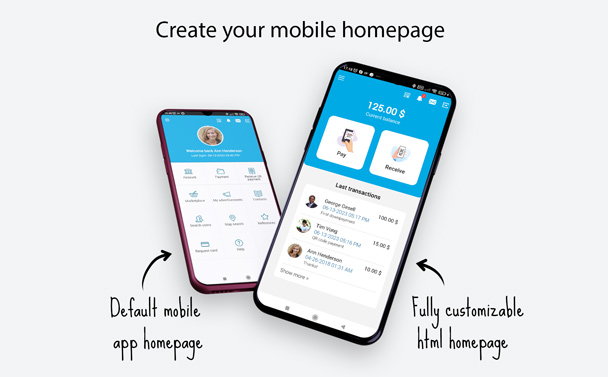
The mobile home page customization has some dedicated features that allow modifying the look & feel of the app. Like other static content pages, the mobile home page can be written in HTML. When the custom home page is enabled (in Content - Static content - mobile home page) a side menu will appear when clicking on the ‘hamburger’ icon in the top bar. The menu has a clean and standard layout and contains the menu items that would appear on the homepage when it is not customized.
The Custom home page can include any operation (built-in or custom operation) and it can also include lists (e.g. last payments). An example of a simple home page with a ‘make payment’ and ‘receive payment’ button and a list of the last payments can be found ton this wiki page.
When a payment is received when the user is viewing the mobile home page or the receive payment page a push notification will be shown. The notification contains the payment information and has a link to the corresponding payment details page.
It is possible to hide the quick access icons in the top bar (with a select box). If the top bar icons are hidden they will be shown in the sidebar. If needed, it is possible to define with CSS what specific top bar icons are shown or hidden.
Improved trusted device activation
A trusted device is a mobile device with the Cyclos mobile app installed on it, that has a cryptographic key stored on the device. This key will never leave the device making it very secure (it is used to encrypt a challenge). The trusted device can only be created when validated by the user using a One Time Password (OTP). Now we improved the flow so that when users register using their mobile phone and confirm the OTP, the device is automatically trusted.
A validated ‘Trusted’ mobile phone can be allowed more permissions such as a higher maximum payment limit, and not requiring a transaction password for specific payments.
Improved access client activation process
The access client in the mobile app is used to activate the Point of Sale (POS) mode of the mobile app. The POS mode is commonly used by shops or businesses that receive frequent consumer-to-business payments (typically QR code or NFC card payments). In previous versions the access client validation required to perform actions in both the web interface and the mobile app. From mobile app 2.13 the validation process can be done from the mobile app. It works the same way as the trusted device activation. In the mobile app settings, a user can click on the ‘send activation code’ button which will send the code to an email address. When the code is entered in the mobile app the access client will be activated, and the POS mode will show up at the login page.
Other improvements
- Show filters in all searches
- Added password visibility toggle in the login form
- Support for custom operations in Contacts and additional contacts
- Add support for sending messages to the system (as a member)
- Keyword search for end-users in records
- Balance is now shown on the perform payment page
- Added option to require a profile image on registration
- Added switch camera button when scanning (front/rear)
- New setting for the preferred camera (front/back)
- Close the Scan QR-code dialog after 1 minute of idleness
- Support for taking a picture when editing profile images
- Notification settings in the mobile app
- New setting for resizing app font (zoom)
- Added support for dynamic multi-selection custom fields
- Share payment details option on transfer details page
- Added a custom field filter on search account history form
- Support for number range filters
- Added missing "View transfer" action in Chargeback details
- Added "Back to home" action in Payment details
- Support for new wizard registration steps (email and mobile phone validation)
- Improved search filters in Account History
- Improved search filters in My Purchases
For more information about Cyclos and the Social Trade Organization (STRO), please visit:
www.cyclos.org
www.socialtrade.org
|